Introduction
A binary code translator is an online or offline tool that converts normal text, numbers, or symbols into binary code and converts binary code back into readable language. In simple words, it helps humans understand the internal language of computers.
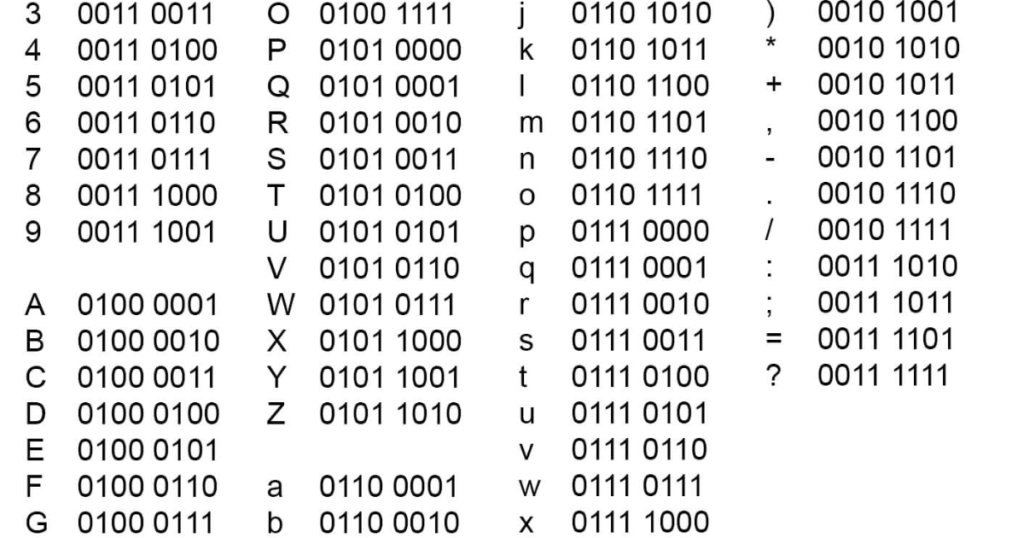
Computers do not read letters like A, B, and C in the same way people do. Instead, they process information using only two digits: 0 and 1. These two digits are called binary digits, or bits.
Every text message, image, file, app, website, and digital tool ultimately depends on machine-level binary signals. That is why a binary code translator is useful. It creates a connection between human language and machine-readable code.
For example:
01001000 01100101 01101100 01101100 01101111 00100001
This binary code means:
Hello!
A binary code translator makes this process quick, easy, and beginner-friendly.
What Is Binary Code in Simple Terms?
Binary code is a system of writing data using only two numbers:
- 0
- 1
In digital systems, these numbers represent two basic states:
- 0 means off
- 1 means on
Computers use electrical signals, and binary makes it easier for hardware to handle data consistently.
Examples of Binary Code
| Data | Binary Example |
|---|---|
| Letter A | 01000001 |
| Letter a | 01100001 |
| Number character 1 | 00110001 |
Binary code is not only used for text. It is also used in images, videos, software, games, files, websites, and digital communication.
What Is a Binary Code Translator?
A binary code translator is a tool that changes binary code into readable text or changes readable text into binary format.
For example, if you type:
Hello
A text to binary tool may convert it into:
01001000 01100101 01101100 01101100 01101111
If you paste that binary code into a binary code decoder, it can convert it back into:
Hello
Main Functions of a Binary Code Translator
A binary code translator usually performs two main tasks:
- Converts text to binary
- Converts binary to readable English text
Some advanced tools also support:
- Decimal conversion
- Hexadecimal conversion
- ASCII conversion
- Unicode conversion
- Binary number conversion
Why Do People Use a Binary Code Translator?
People use a binary code translator because binary code is difficult to read manually, especially when the code is long. A tool saves time, reduces mistakes, and gives instant results.
Common Uses of Binary Code Translators
- Learning computer science basics
- Understanding ASCII encoding
- Converting text to binary
- Decoding binary messages
- Creating secret messages
- Checking binary number values
- Teaching students how computers store text
- Testing simple encoding examples
- Understanding digital data
A binary code translator is especially helpful for beginners because it removes confusion and shows results quickly.
How Does a Binary Code Translator Work?
A binary code translator works by using character encoding systems such as ASCII or Unicode.
These systems assign a number to each character. That number is then converted into binary.
Example of Binary Translation
The capital letter H has an ASCII decimal value of 72.
The decimal number 72 in binary is:
01001000
So when a tool converts H into binary, it shows:
01001000
Example: “Hi” in Binary
| Character | ASCII Decimal | Binary Code |
|---|---|---|
| H | 72 | 01001000 |
| i | 105 | 01101001 |
So Hi in binary is:
01001000 01101001
This is the basic logic behind a binary code translator.
What Does Text to Binary Mean?
Text to binary means converting human-readable text into binary digits.
Example of Text to Binary
Text:
Cat
Binary:
01000011 01100001 01110100
Each letter is converted into an 8-bit binary value. One group of 8 bits is called one byte.
Why Text to Binary Is Useful
Text to binary helps users understand how computers represent:
- Letters
- Words
- Numbers
- Symbols
- Punctuation marks
What Does a Binary to English Translator Do?
A binary to English translator converts binary values back into readable English text.
Example of Binary to English
Binary:
01001000 01100101 01101100 01101100 01101111
English:
Hello
A binary to English translator reads each group of binary digits, finds the matching character value, and displays the final text.
This is useful when you receive a binary message and want to decode it quickly.
What Is a Binary Code Generator?
A binary code generator creates binary output from text, numbers, or symbols. It works like the text to binary part of a binary code translator.
Example of a Binary Code Generator
Input:
AI
Generated binary:
01000001 01001001
Many users search for a binary code generator when they want to create binary messages for:
- Learning
- Puzzles
- Programming examples
- Social media posts
- Educational projects
What Is a Binary Code Decoder?
A binary code decoder converts binary back into readable information. It is the reverse of a binary code generator.
Example of Binary Code Decoding
Input:
01000010 01101001 01101110 01100001 01110010 01111001
Decoded result:
Binary
A binary code decoder is useful when you already have binary code and need to understand what it says.
Binary Code Translator Features, Benefits, and Examples
| Feature | Description | Benefit | Example |
|---|---|---|---|
| Text to binary | Converts normal text into binary code | Helps users understand machine-level text representation | Hello → 01001000 01100101 01101100 01101100 01101111 |
| Binary to English translator | Converts binary into readable text | Makes binary messages easy to understand | 01001000 01101001 → Hi |
| Binary code decoder | Decodes binary sequences | Useful for students and beginners | 01000001 → A |
| Binary code generator | Creates binary from text or symbols | Helps create binary examples quickly | Code → binary output |
| ASCII support | Uses character values to convert text | Improves accuracy | A = 65 = 01000001 |
| Number conversion | Converts binary numbers into decimal | Helps with math and computer science | 10101 = 21 |
| Copy-paste output | Lets users copy binary results | Saves time | Copy generated binary for projects |
| Beginner-friendly interface | Simple input and output boxes | Easy for non-technical users | Paste text and click translate |
How to Read Binary Code Step by Step
You can read binary code manually if you understand place values. Binary uses powers of 2.
For an 8-bit binary number, the place values are:
| 128 | 64 | 32 | 16 | 8 | 4 | 2 | 1 |
|---|
Example: Reading 01000001
| Binary Digit | 0 | 1 | 0 | 0 | 0 | 0 | 0 | 1 |
|---|---|---|---|---|---|---|---|---|
| Value | 128 | 64 | 32 | 16 | 8 | 4 | 2 | 1 |
Only the places with 1 are counted:
64 + 1 = 65
In ASCII, decimal 65 represents:
A
So:
01000001 = A
This is how a binary code translator reads binary behind the scenes.
Simple Method to Decode Binary Text
To decode binary text manually:
- Split the binary into 8-bit groups.
- Convert each group into decimal.
- Match the decimal number with an ASCII character.
- Write the characters together.
- Read the final text.
Example
Binary:
01001000 01101001
Step-by-step:
01001000= 72 = H01101001= 105 = i
Final result:
Hi
A binary code translator completes these steps instantly.
Common Binary Code Examples
101010 Binary Code
101010 in binary equals 42 in decimal.
Calculation:
32 + 8 + 2 = 42
So:
101010 = 42
10101 Binary Code
10101 in binary equals 21 in decimal.
Calculation:
16 + 4 + 1 = 21
So:
10101 = 21
1011010 Binary Code
1011010 in binary equals 90 in decimal.
Calculation:
64 + 16 + 8 + 2 = 90
So:
1011010 = 90
11111111 Binary Code
11111111 in binary equals 255 in decimal.
It is the highest value that can be stored in an 8-bit unsigned byte.
What Does 01001000 01100101 01101100 01101100 01101111 00100001 Mean?
This binary code means:
Hello!
Binary Breakdown
| Binary | Decimal | Character |
|---|---|---|
01001000 | 72 | H |
01100101 | 101 | e |
01101100 | 108 | l |
01101100 | 108 | l |
01101111 | 111 | o |
00100001 | 33 | ! |
So the full decoded message is:
Hello!
This is one of the most popular examples used to explain how a binary code translator works.
How Do I Say “Hi” in Binary?
The word hi in lowercase binary is:
01101000 01101001
The word Hi with capital H is:
01001000 01101001
Why Uppercase and Lowercase Binary Is Different
Uppercase and lowercase letters have different ASCII values.
- H =
01001000 - h =
01101000 - i =
01101001
A binary code translator automatically recognizes the character and converts it correctly.
What Is 777 in Binary Code?
The decimal number 777 in binary is:
1100001001
This is a number conversion, not a text conversion.
Important Difference
- 777 as a number =
1100001001 - “777” as text =
00110111 00110111 00110111
A binary code translator may give different results depending on whether you enter 777 as a number or as text.
What Does 666 Mean in Binary?
The decimal number 666 in binary is:
1010011010
This is number conversion.
If you type 666 as text, each digit is converted separately:
- 6 =
00110110 - 6 =
00110110 - 6 =
00110110
So “666” as text becomes:
00110110 00110110 00110110
This difference is important when using a binary code translator.
What Is 0.75 in Binary?
The decimal number 0.75 in binary is:
0.11
Why 0.75 Equals 0.11 in Binary
- 0.5 =
0.1 - 0.25 =
0.01 - 0.5 + 0.25 = 0.75
So:
0.75 = 0.11 in binary
This is an example of fractional binary conversion.
Difference Between Binary Text and Binary Numbers
Many beginners confuse binary text with binary numbers. A binary code translator may handle both, but they are not always the same.
Binary Text
Binary text represents characters.
Example:
Text:
A
Binary:
01000001
This is based on ASCII encoding.
Binary Number
Binary numbers represent numeric values.
Example:
Decimal:
5
Binary:
101
This is based on mathematical conversion.
Why the Difference Matters
If you type 5 into a text to binary tool, it may return:
00110101
That is because the character “5” has an ASCII value of 53.
But if you convert the number 5 into binary, the result is:
101
Both are correct, but they mean different things.
ASCII and Binary Code
ASCII stands for American Standard Code for Information Interchange. It is one of the most common systems used to represent text in computers.
ASCII assigns numbers to:
- Letters
- Digits
- Punctuation marks
- Control characters
Common ASCII and Binary Examples
| Character | ASCII Decimal | Binary |
|---|---|---|
| A | 65 | 01000001 |
| B | 66 | 01000010 |
| a | 97 | 01100001 |
| b | 98 | 01100010 |
| 0 | 48 | 00110000 |
| 1 | 49 | 00110001 |
| Space | 32 | 00100000 |
| ! | 33 | 00100001 |
A binary code translator commonly uses ASCII when converting simple English text into binary.
Unicode and Binary Code
Unicode is a broader character encoding system. It supports many languages, symbols, emojis, and special characters.
ASCII works well for basic English text, but Unicode is needed for:
- Hindi
- Japanese
- Arabic
- Chinese
- Emojis
- Special symbols
- Mathematical characters
Why Unicode Matters
An emoji cannot be represented using basic ASCII. It needs Unicode encoding.
Modern tools often use UTF-8, which is a Unicode-based encoding system. A good binary code translator should clearly show which encoding format it uses.
Facts and Statistics About Binary Code
| Fact | Explanation |
|---|---|
| Binary uses 2 digits | Binary code only uses 0 and 1. |
| 1 byte has 8 bits | Most text binary examples use 8-bit groups. |
| 8 bits can represent 256 values | Values range from 0 to 255. |
| 7-bit ASCII represents 128 values | Standard ASCII covers values from 0 to 127. |
| The letter A is ASCII 65 | In binary, it is 01000001. |
| The space character is ASCII 32 | In binary, it is 00100000. |
| “Hello!” uses 6 characters | In 8-bit binary, it uses 48 bits. |
| IPv4 addresses use 32 bits | This is another common use of binary in networking. |
These facts show why binary is important in data storage, digital communication, and computing.
Pros and Cons of Using a Binary Code Translator
Pros
- Easy for beginners
- Saves time
- Reduces manual conversion mistakes
- Helps students learn binary code
- Converts long binary messages quickly
- Useful for text to binary and binary to English translation
- Helps explain ASCII and encoding clearly
- Works well for basic coding lessons and examples
Cons
- Some tools may not explain the encoding format
- Results may differ between ASCII and Unicode tools
- Number conversion and text conversion can confuse beginners
- Copy-paste errors can break binary output
- Missing spaces between 8-bit groups may cause wrong decoding
- Not all tools handle emojis or special characters correctly
A binary code translator is helpful, but users should also understand the basic logic behind the result.
Common Beginner Mistakes With Binary Code
Mixing Text and Number Conversion
The number 7 and the text character “7” are not the same in binary.
- Number 7 =
111 - Text “7” =
00110111
Ignoring 8-Bit Groups
Binary text is usually written in groups of eight bits.
Wrong:
0100100001101001
Better:
01001000 01101001
Removing Spaces Accidentally
Spaces help a binary code translator identify each byte. If spaces are missing, the tool may still decode it, but errors become more likely.
Using the Wrong Encoding
ASCII, UTF-8, and Unicode may give different results for special characters.
Expecting All Binary to Be English
Not every binary sequence represents English text. Some binary values represent numbers, files, instructions, colors, or machine data.
Best Tips for Using a Binary Code Translator
Use these tips to get accurate results:
- Choose the correct mode: text to binary or binary to text.
- Use spaces between 8-bit binary groups.
- Check whether the tool uses ASCII or UTF-8.
- Avoid adding extra symbols unless needed.
- Copy the full binary code carefully.
- Understand whether your input is text or a number.
- Test short words first, such as Hi or Hello.
- Use a binary code decoder for unknown binary messages.
- Use a binary code generator when creating binary from text.
These simple habits can help you avoid incorrect results.
Featured Snippet: What Is a Binary Code Translator?
A binary code translator is a tool that translates readable text into binary code and binary code back into readable text. Character encoding methods like ASCII or Unicode are usually used. It is commonly used to decode binary codes, convert text to binary, translate binary to English, and understand how computers represent data using 0 and 1.
Binary Code Translator vs Binary Code Generator vs Binary Code Decoder
| Tool | Main Purpose | Input | Output |
|---|---|---|---|
| Binary code translator | Converts both ways | Text or binary | Binary or text |
| Binary code generator | Generates binary code | Text or numbers | Binary |
| Binary code decoder | Decodes binary | Binary | Text or numbers |
| Text to binary tool | Converts readable text | Human-readable text | Binary text |
| Binary to English translator | Converts binary groups | Binary code | English text |
The most versatile choice is a binary code translator because it typically supports both encoding and decoding.
Who Uses Binary Code Translators?
Students
Students use binary tools to learn digital logic, ASCII, number systems, and computer fundamentals.
Teachers
Teachers use binary examples to explain how computers store and analyze text.
Programmers
Programmers may use binary conversion to study low-level ideas, test encoding, or debug simple data issues.
Cybersecurity Learners
Cybersecurity students may study binary to understand data, encoding, packets, and system behavior.
Web Tool Users
Many people use binary tools for entertainment, puzzles, online messages, or instructional materials.
Digital Electronics Learners
Logic gates, circuits, processors, and embedded systems all depend on binary.
Jobs That Use Binary Code
Many careers involve binary concepts, even if professionals do not write binary by hand every day.
Common Jobs Related to Binary Code
- Software developer
- Computer science teacher
- Data analyst
- Network engineer
- Cybersecurity analyst
- Embedded systems engineer
- Computer hardware engineer
- Game developer
- Electronics engineer
- IT support specialist
- Database administrator
- Cloud engineer
These positions often require a basic or advanced understanding of how digital data works.
Is It Worth Using a Binary Code Translator?
Yes, a binary code translator is worth using if you want to quickly understand, decode, or produce binary code. It is especially helpful for beginners because manual conversion can be slow and difficult.
However, the tool should not replace basic understanding. You can use the tool more accurately if you understand how binary values work.
Best Learning Approach
- Learn what 0 and 1 mean.
- Understand bits and bytes.
- Learn basic ASCII examples.
- Use a binary code translator for practice.
- Try manually decoding short binary messages.
This gives you both speed and understanding.
Future Trends in Binary Translation Tools
Binary itself is not going away because binary logic is still essential to modern computers. However, binary tools are becoming more user-friendly.
Future Improvements in Binary Tools
- Improved Unicode support
- Better mobile-friendly interfaces
- Quick conversion between binary, decimal, hexadecimal, and text
- Educational explanations for every result
- Integrated ASCII tables
- Error detection for invalid binary input
- Improved emoji and multilingual text support
- Step-by-step conversion instructions
A modern binary code translator should provide more than just a result. It should also help users understand the result.
Internal Linking Suggestions
You can internally link this article to related topics such as:
- Text to Binary Converter
- Binary to English Translator
- Binary Code Decoder
- Binary Code Generator
- How Binary Code Is Read
- ASCII Table for Beginners
- Decimal to Binary Converter
- Binary Number System Explained
- Computer Fundamentals for Beginners
- Difference Between Unicode and ASCII
These internal links improve topical authority and help users explore related content.
External Resource Topic Suggestions
You can link to reliable learning resources about:
- ASCII character table
- Unicode character encoding
- Binary number system
- Computer science fundamentals
- Digital logic basics
- Number system conversion
- UTF-8 encoding
Choose trustworthy, educational, and non-spammy resources. This supports EEAT and improves reader trust.
FAQs About Binary Code Translator
What is the purpose of a binary translator?
A binary translator is used to convert text into binary code or binary code into readable text. Students, teachers, programmers, and beginners use it to understand how computers represent data.
What does 01001000 01100101 01101100 01101100 01101111 00100001 mean?
01001000 01100101 01101100 01101100 01101111 00100001 means Hello! in ASCII text.
What is a binary code translator?
A binary code translator is a tool that converts human-readable text into binary code and converts binary code back into readable text.
How do I say “hi” in binary?
Lowercase hi in binary is:
01101000 01101001
Capitalized Hi in binary is:
01001000 01101001
What does 11111111 mean in binary code?
11111111 equals 255 in decimal. It is the maximum value of an 8-bit unsigned binary number.
What is 777 in binary code?
The decimal number 777 in binary is:
1100001001
What does 666 mean in binary?
The decimal number 666 in binary is:
1010011010
When 666 is converted as text, it becomes:
00110110 00110110 00110110
What does 10101 mean in binary code?
10101 in binary equals 21 in decimal.
What is binary code in simple terms?
Binary code is a data representation system that uses only 0 and 1. Computers use binary because digital circuits operate in two basic states: on and off.
What is 0.75 in binary?
The decimal number 0.75 in binary is:
0.11
This is because 0.75 equals 0.5 plus 0.25.
Which language uses binary code?
Computers use binary code at the hardware level. Humans write programming languages like Python, Java, C, and JavaScript, but computers eventually process instructions in binary form.
How do I read binary code?
To read binary code, divide it into groups of eight bits. Then convert each group to decimal and match the decimal value with an ASCII character.
What jobs use binary code?
Jobs that use binary concepts include software developer, network engineer, cybersecurity analyst, electronics engineer, embedded systems engineer, data analyst, and computer science teacher.
Conclusion
A binary code translator is a simple but powerful tool for understanding the relationship between computer data and human language. It can convert text to binary, decode binary to English, create binary code, and explain how digital systems use 0 and 1 to represent information.
For beginners, it makes binary code easier to understand. For students, it supports computer science learning. For teachers, it gives clear examples. For programmers and technical learners, it provides a fast way to check binary values and encoding.
The most important thing to remember is simple: digital computing is built on binary, and a binary code translator makes it easier to view, read, and understand.